

In today’s digital world, user experience is crucial. Assuring a smooth purchasing experience across several websites is a regular difficulty for Magento 2 store owners managing a multi-website configuration. A common request we often receive is how to keep customer login sessions active when a customer navigates between two different websites under the same Magento 2 admin.
In this blog post, we’ll walk you through the steps to configure Cookies in a way that your customers stay logged in when they switch between different websites in your Magento store.
You have to keep the below pre-conditions in mind before setting it up.
Use a common domain for both websites. For example, if your first website is dhairvi.com, then your second website should be abc.dhairvi.com
Here, dhairvi.com is both sites’ primary domain, and we will use dhairvi.com to set the cookies.
Steps to Keep Customer Login Active Across Websites in Magento 2
Magento uses cookies to manage user sessions. By default, cookies are set for individual websites, but you can configure cookies like below, and it will use shared cookies on both sites.
Step 1: First, you have to set the Cookie Domain. For that go to Magento 2 admin > STORES > Configuration > GENERAL >Web > Default cookie Settings
Here, insert the main domain to the “Cookie Domain” field, as shown in below screenshot
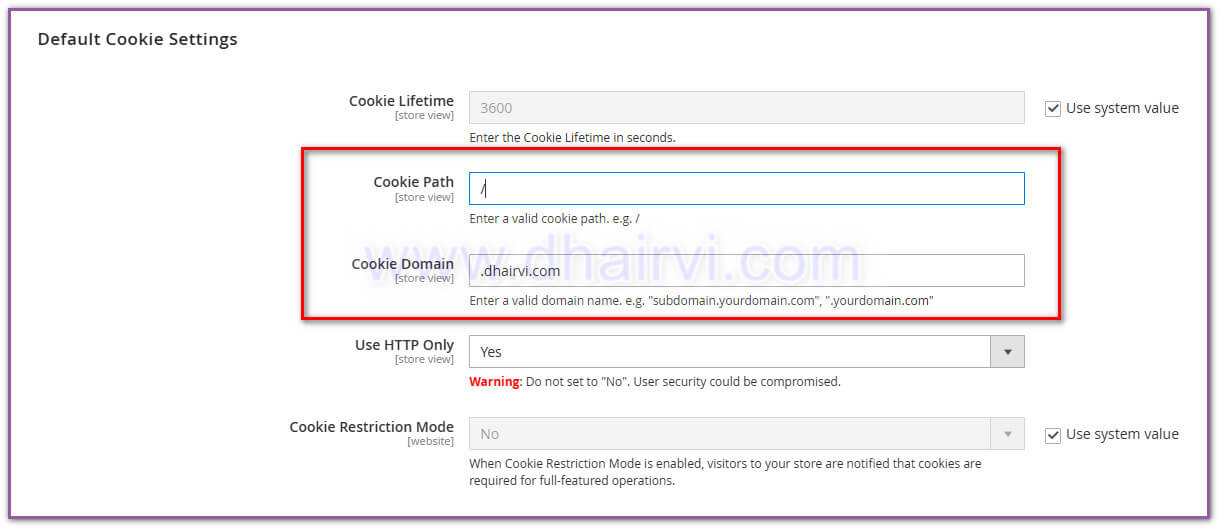
Step 2: The second step is to set Cookie Path: Just insert the / to “Cookie Path,” so it will access from all subdomains.
The problems with users signing out when switching between two sites can be resolved by following the two steps above. Try adjusting the session parameters as well if the above will not work, such as switching to the database settings rather than a file. The session can be managed from app/etc/env.php
Keeping customer login sessions active across multiple websites in Magento 2 requires a strategic approach. As a Magento developer, by implementing the right configurations and utilizing native features of Magento, you can deliver a user-friendly, seamless, and secure website to your clients.
Pro Tip: Always test your session management thoroughly across different scenarios and website configurations to ensure a smooth user experience. Also keep security in mind as always.
About Dhairvi Solutions
Dhairvi Solutions specializes in Magento 2 website development, offering expert solutions to complex e-commerce challenges. Our team of experienced developers can help you optimize your Magento 2 implementation for peak performance and user experience.