

It can be annoying to see the error message “Sorry, you need permission to view this content” when attempting to log into your Magento 2 admin panel. Incorrect user role permissions or faulty access control lists (ACL) in your Magento installation are usually the cause of this error.
We’ll examine the typical reasons for this mistake in this blog article and offer detailed fixes to assist you in getting it fixed as soon as possible.
What Does the Error “Sorry, You Need Permissions to View This Content” Mean?
According to this error notice, the Magento 2 admin user account you are using does not have the appropriate permissions to access specific backend components, such as setup admin 2-factor authentication.
Here is the screenshot of that error message when you log in to the Magento 2 admin.

Fixing the “Sorry, You Need Permissions to View This Content” Error
To fix that permission issue, follow the below steps.
Step 1: Log in to Magento 2 admin who has the “Administrators” role or permission. Which means it has full admin access.
Step 2: Navigation to System > Permissions > User Roles
Step 3: Find the role that is assigned to the admin user who is having this error. Edit that role and navigate to the “Role Resources” tab.
Step 4: Then select “Two Factor Auth” as shown below and save that role.
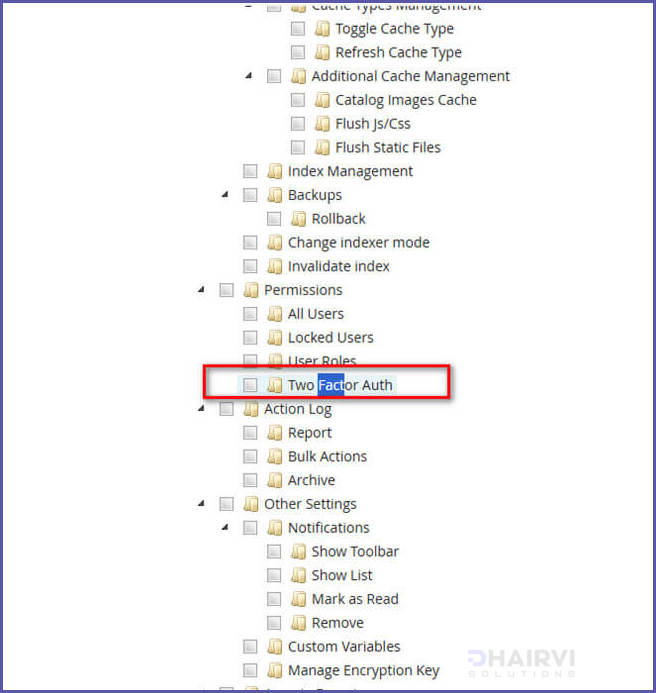
Please re-login to the admin after you are done with the above steps, and you will see that the error will be gone.
This error will only occur when admin Two Factor is enabled. So after that error is fixed, make sure to follow and configure the 2 factors for admin.