

You’re not the only one who has discovered that the checkout process no longer recognizes registered accounts after upgrading to Magento 2.4.6-p3. The issue is that you are already a registered customer, so insert your email into the checkout page, but it does not ask for a password. This problem may cause your clients to become frustrated and even lose purchases by interfering with their smooth purchasing experience. What you need to know about this issue and its solution is provided in this blog post by Dhairvi Solutions.
This isn’t a bug; enabling guest checkout login is available starting with Magento 2.4.6-p3. This setting is turned off by default to prevent unauthorized users from determining whether an email address is already associated with a customer account.
How to Allow Registered Users to Log In from the Checkout Page
Below are steps to Enable Guest Checkout Login
Step 1: Log in to Magento Admin and navigate to the below location
STORES > Configuration > SALES > Checkout
Step 2: Expand “Checkout Options”
Step 3: Set Yes to “Enable Guest Checkout Login”
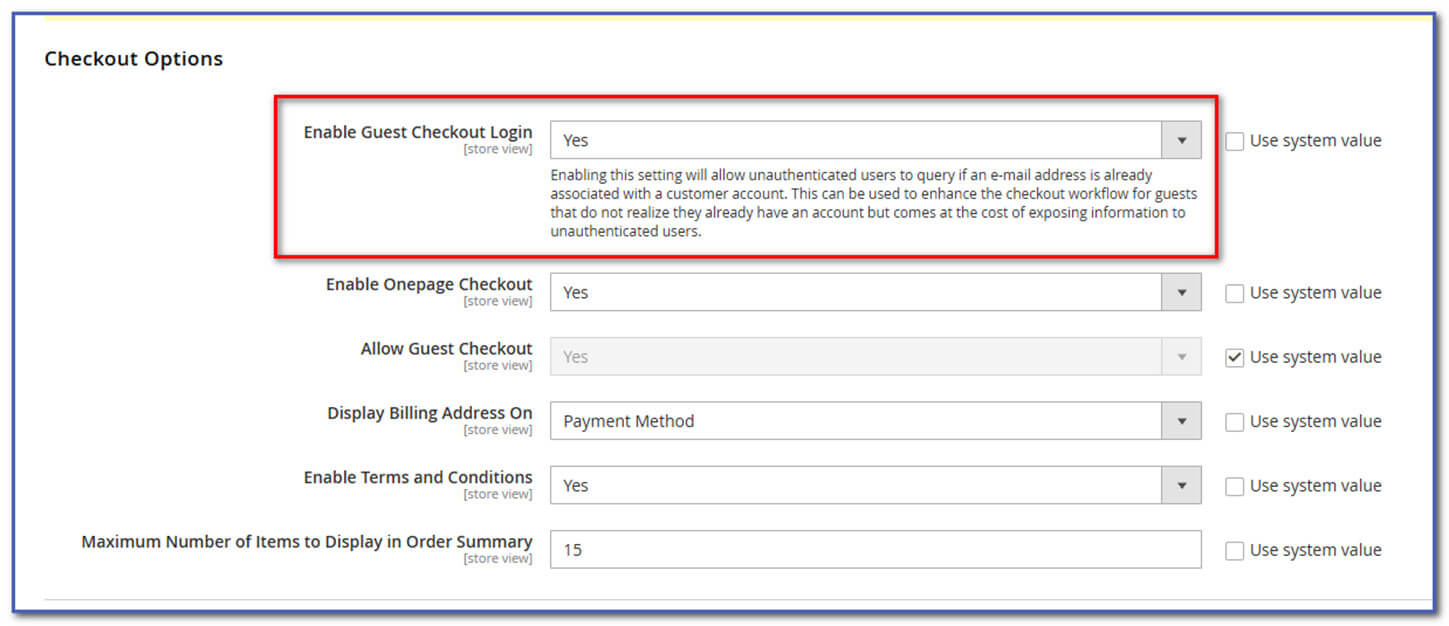
While the “Enable Guest Checkout Login” setting offers the quickest fix for the checkout account detection issue, it’s essential to understand the security implications before enabling it. The improved customer experience is worth the minimal security trade-off for most merchants, but each store owner should evaluate their specific security requirements.
Check out our new blog, “How to Keep Customer Login Sessions Active Across Multiple Websites in Magento 2,” to learn how to allow customers to log in with the same account across your multiple websites.