

Customers can locate what they need more quickly using Magento 2’s robust layered navigation functionality, which lets users filter products by price, characteristics, categories, and other factors. For various reasons, including enhancing user experience or streamlining the navigation structure, you might occasionally wish to eliminate category from the layered navigation.
How to Disable Category Filter from Layered Navigation
The ways to remove the category filter from Magento admin without any technical expertise or customization are listed below.
Step 1: Go to Admin > STORES > Configuration CATALOG > Catalog
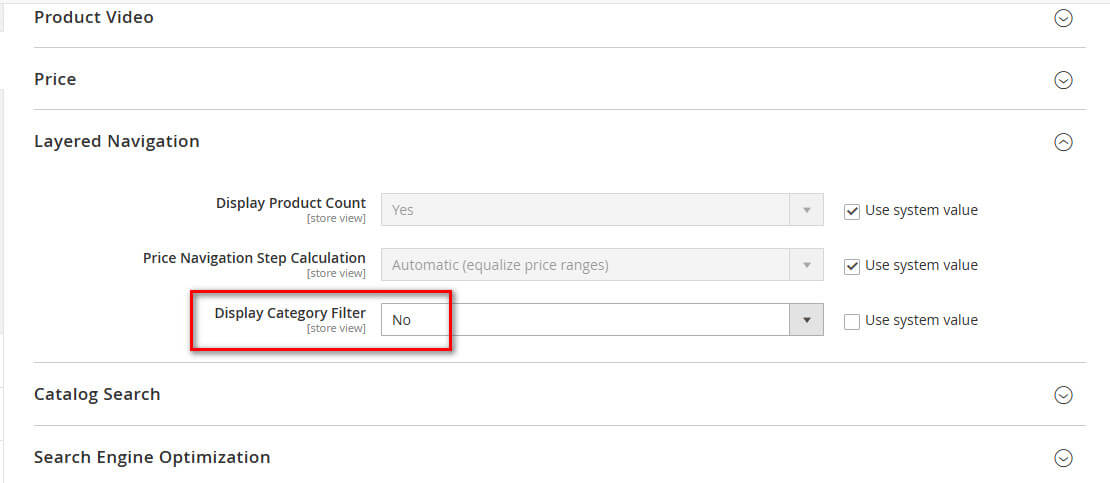
Step 2: Expand the “Layered Navigation” tab.
Step 3: set “No” to “Display Category Filter“.
To update the Display Category Filter attribute, first uncheck the “Use system value” checkbox, and then you can edit this attribute.
Happy store managing!
For information on how to regenerate the category URL, see our blog post “Magento 2 Regenerate Category URL Rewrites”.