

Adobe Commerce provides a feature to restrict guest users’ access by enabling Website Restriction Mode. If users try to access any page without login, they will be redirected to the login page and asked to log in before accessing the website’s page.
How to restrict website access for the guest user in Magento 2
Follow the below steps to restrict guest user access in the Magento 2 commerce cloud.
NOTE: This feature is only available in the Adobe Commerce (Magento Enterprise) version.
Step 1: Navigate to Magento 2 Admin > STORES > Configuration > GENERAL > General
Step 2: Open the “Website Restrictions” tab, and you will see the options below.
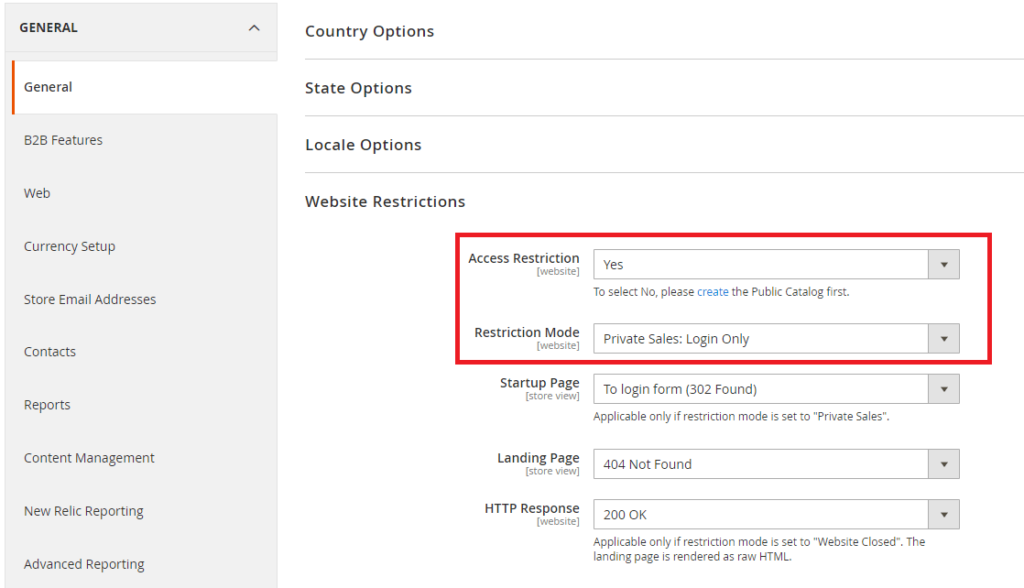
Step 3: Here, you can see a few fields that you have to choose from, as shown below.
Access Restriction: Set this value to Yes.
Restriction Mode: Select “Private Sales: Login Only” or “Private Sales: Login and Register”
Startup Page: To login form (302 Found)
Step 4: Finally, save the setting, and that’s it.
This is how Adobe Commerce Website native features help to restrict website access without modifying a single code.