

One of the most widely used code editors for developers worldwide is Visual Studio Code (VS Code). It offers a number of strong features to improve your coding skills. The ability to rapidly remark on many lines of code is one of these capabilities, which facilitates debugging, testing, and code documentation.
Whether you’re working with PHP, JavaScript, Python, C++, or any other programming language that Visual Studio Code supports, we’ll show you how to comment on multiple lines in this blog post.
Windows Shortcut for comment multiple lines in Visual Studio Code
If you are looking for a shortcut to comment multiple lines in Visual Studio Code on your Windows system, then you are on the correct path.
Block Comment: Shift + Alt + A
Below is the output of the block comment shortcut command on the Windows system.

Line Comment: Ctrl + /
Below is the output of the line comment shortcut command on the Windows system.

How to get Keyboard Shortcuts in Windows of Visual Studio Code
The steps below allow you to get a list of all Visual Studio Code windows shortcuts.
Step 1: Open the Command Palette either by right click on any open file or by Ctrl + Shift + P
Step 2: Search “Keyboard Shortcuts Reference,“ and you will get a list of all the shortcut commands.
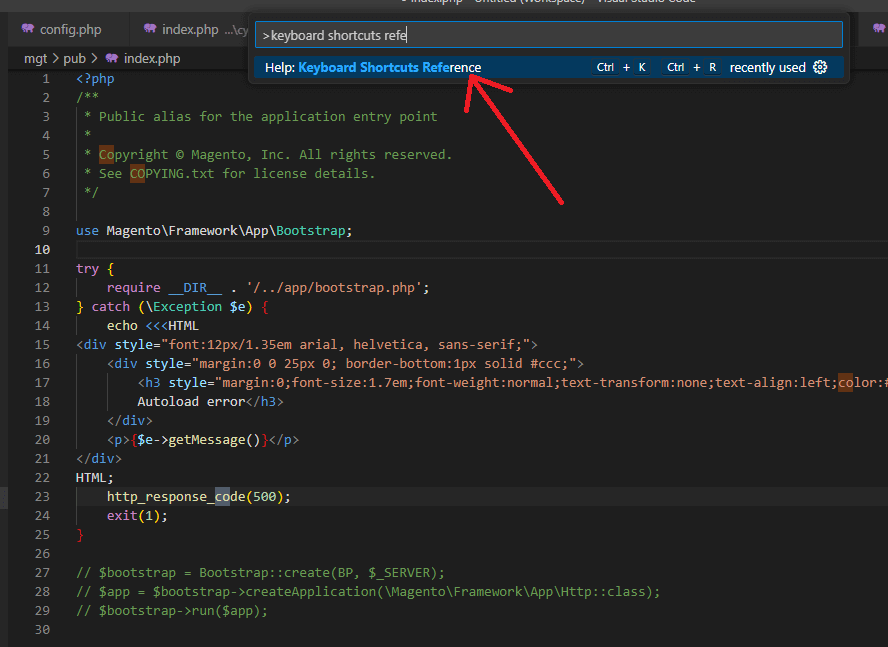
Once you click on K, you will be redirected to the link below, where you can see all the Windows shortcuts for VS Code.
https://code.visualstudio.com/shortcuts/keyboard-shortcuts-windows.pdf