

Adobe Commerce Cloud (formerly known as Magento Commerce) has a powerful feature called returned merchandise authorization (RMA) that allows magento customers to request a return of the item. However, many users have encountered an issue where the “Create Returns” button is missing for some orders. This blog post will explore all possible reasons for this issue and provide solutions to restore the missing functionality.
Reasons for the Missing “Create Returns” Button in Magento 2
Below are some of the reasons why the return button is missing.
- Make sure RMA is enabled:
First, make sure that the RMA is enabled for your Magento website.
To ensure that. You can navigate to Magento 2 Admin > STORES > Configurations > SALES > Sales > RMA Settings

- Return is disabled for the order item:
Suppose RAM is enabled from store configuration. Still, if RMA is disabled on the item level, you can’t see the return button. This means RMA is set to NO for that particular order item, and in this case, you can’t see the Create Returns button for the orders containing this item.
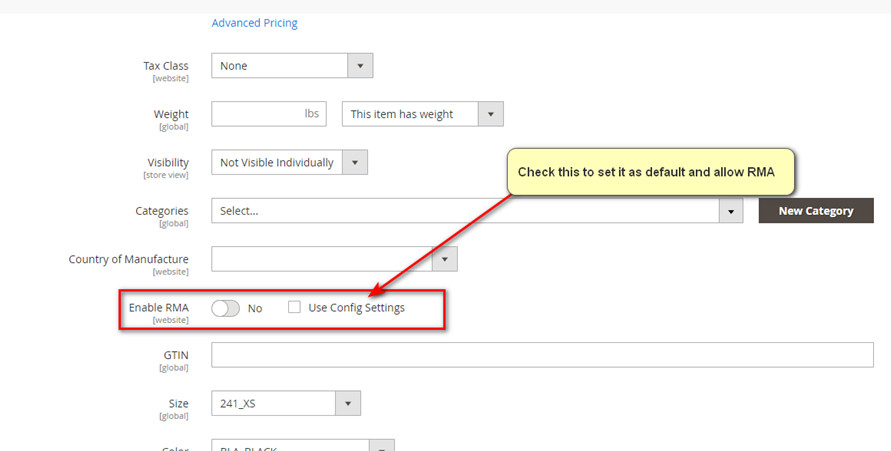
- Permission issue:
If your admin user role has limited access and not all RAM features are assigned to your admin role, then you can see the Create Returns button on the order view page.
Check out our previous blog post, “How to Access .well-known URL in Adobe Commerce Cloud,” to learn how to run .well-know URL in Adobe Commerce Cloud for Apple Pay domain validation.