

If you’re working with Adobe Commerce Cloud (formerly Magento Commerce Cloud), you may need to access the URL /.well-known/apple-developer-merchantid-domain-association.txt to validate the domain for Apple Pay. However, you may realize that you don’t have permission to create the .well-known directory at the root of the Adobe Commerce Cloud server. If you find yourself in this situation, keep reading to learn how to access the .well-known URL.
Step to Create the .well-known URL to validate domain for Apple Pay
Step 1: Create the .well-known directory under /pub/media/
Step 2: Then download the apple-developer-merchantid-domain-association.txt file from Apple Pay and upload it to /pub/media/.well-known/
Step 3: Log in to Magento 2 admin and navigate to STORES > Configurations > ADVANCED > System and then expand Full Page Cache
Step 4: Then navigate to Custom VCL Snippets, expand it, and click on the Create button
Step 5: The page below will pop up when you click the Create button.
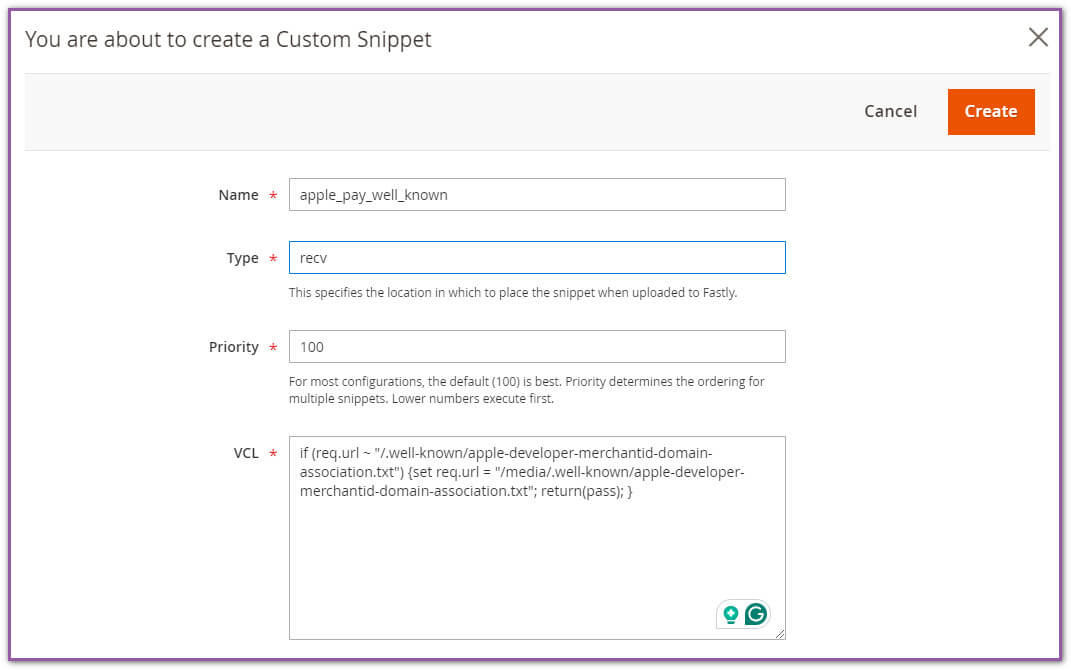
Insert the values below to this page.
Name = Insert any user-friendly name that tells what this snippet is for.
Type = recv
Priority = 100
VCL = Insert below to VCL text area
if (req.url ~ "/.well-known/apple-developer-merchantid-domain-association.txt") {set req.url = "/media/.well-known/apple-developer-merchantid-domain-association.txt"; return(pass); }
Step 5: Click on the Create button to save it, and then make sure to click on Upload Fastly VCL to upload them to Fastly.
Once you are done with these steps, you can access the .well-known URL using the link below, even though we have uploaded it to the media directory.
https://your_domain/.well-known/apple-developer-merchantid-domain-association.txtFeel free to contact us if you need Adobe Commerce Cloud setup and configuration assistance.
Do not forget to check our previous blog post, “Magento 2 Disable Quantity Text Field On Admin Product Page” to learn how to disable qty in admin products.